Pages

Monday, 27 June 2011

Constants in C


The quantities involved in programming are not all of variable types alone. Some of the quantities do not change their values as variables do. They are called constants.
A constant is an entity with fixed value that does not change. It can be stored at a location in the memory of the computer and can be referenced through that memory address. There are four basic types of constants in C, viz. integer constants, floating- point constants, character constants and string constants. Composite types may also have constants.
Integer and floating-point constants represent numbers. They are often referred to collectively as numeric-type constants.
C imposes the following rules while creating a numeric constant type data item:
Commas and blank spaces cannot be included within the constants
• The constant can be preceded by a minus(-) sign if desired.
• Value of a constant cannot exceed specified maximum and minimum bounds.
For each type of constant, these bounds will vary from one C-compiler to
another.
Constants are the fixed values that remain, unchanged during the execution of a program and are used in assignment statements Constants can also be stored in variables.
The declaration for a constant in C language takes the following form:
const datatype var_name = value;

Exapmle: const float pi = 22/7;

This declaration defines a constant named pi whose value remains 22/7 throughout the program in which it is defined.
C language facilitates five different types of constants.
1. Character
2. Integer
3. Real
4. String
5. Logical
Character Constants: A character constant consists of a single character, single digit, or a single special symbol enclosed within a pair of single inverted commas. The maximum length of a character constant is one character.
Ex.:'a' is a character constant
Ex.: 'd' is a character constant
Ex.: 'P' is a character constant
Ex.: '7' is a character constant
Ex.: '*' is a character constant
Integer Constants: An integer constant refers to a sequence of digits and has a numeric value. There are three types of integers in C language: decimal, octal, hexadecimal.
Decimal integers : 1,56, 7657,-34 etc.
Octal integers : 076, -076,05 etc. (preceded by zero, 0)
Hexadecimal integers : 0x56, -0x5D etc. (preceded by zero, Ox)
No commas or blanks are allowed in integer constants.
Real or floating point Constants: A number with a decimal point and an optional preceding sign represents a real constant.
Exapmle: 34.8, -655.33, .2, -.56, 7.
Note that 7 is an integer while 7. or 7.0 is real.
Another notation (called scientific notation) for real constants consists of three parts:
i) A sign (+ or 0) preceding the number portion (optional).
ii) A number portion
iii) An exponent portion following the number portion (optional). It
starts with E or e followed by an integer. Which may or may not
be preceded by a sign.
Example:


Valid Representations


Invalid Representations


+ . 72


12 (no decimal)


+ . 72


12 (no decimal)


+ 72.


7.6 E + 2.2(non integer exponent)


+ 7.6 E + 2


1.2 E9229892(very large exponent)


24.4e-5

String Constants: A string constant is a sequence of one or more characters enclosed with in a pair of double quotes (" "). If a single character is enclosed within a pair of double quotes, it will also be interpreted as a string constant and not a character constant.
Exapmle:
1. "Welcome To C Programming \ n"
2. "a"
Actually, a string is an array of characters terminated by a NULL character. Thus, "a" is a string consisting of two characters, viz. 'a' and NULL('\0')
Logical Constants:A logical constant can have either true value or false value. In C, a non zero value is treated as true while 0 is treated as false.

c programmming online,basic of c language,structure of c programming,c language statements,Compiling a C Program,Pseudo Codes in c,basis data type in c ,variables in C Program,constants in C Program,c operators in C Program,special operators in C ,Decision Making,Branching & Looping in C Program,if statement in C Program,for loop in C Program

Variables in C


A variable is an entity whose value can change during program execution. A variable can be thought of as a symbolic representation of address of the memory space where values can be stored, accessed and changed. A specific location or address in the memory is allocated for each variable and the value of that variable is stored in that location.

Each variable has a name, data-type, size, and the value it stores. All the variables must have their type indicated so that the compiler can record all the necessary information about them, generate the appropriate code during translation and allocating required space in memory.

Every programming language has its own set of rules that must be observed while
writing the names of variables. If the rules are not followed, the compiler reports
compilation error. Rules for Constructing Variable Name in C language are listed
below:

a. Variable name may be a combination of alphabets, digits or underscores.
Sometimes, an additional constraint on the number of characters in the
name is imposed by compilers in which case its length should not exceed
8 characters.
b. First character must be an alphabet or an underscore (_).
c. No commas or blank spaces are allowed in a variable name.
d. Among the special symbols, only underscore can be used in a variable name.
e.g.: emp_age, item_4, etc.
e. No word, having a reserved meaning in C can be used for variable name.

Note that C language is a case-sensitive language which differentiates between lower case and upper case. Thus, CAT is different from Cat, cAT, CaT. Although any word complying with the rules cited above can be used as the variable name, it is advised tha you create variable names that have some meaning. Thus, you may chose sum as the variable name for storing sum of numbers rather than choosing X.

Type Declaration

C language is strongly typed language, meaning that all the variables must be declared before their use. Declaration does two things:
It tells the compiler what the variable name is.
It specifies what type of data the variable will hold.
In C language, a variable declaration has the form:


Here is one of the valid data types (e.g. int, float, char, etc.). List-of-variables is a comma-separated list of identifiers representing the program variables.
e.g.-
a. int i, j, k; //creates integer variables i,j and K
b. char ch; //creates a character type variable ch
Once variable has been declared in the above manner, the compiler creates a space in the memory and attaches the given name to this space This variable can now be used in the program.
A value is stored in a variable using assignment operation. Assignment is of the form:
Variable-name = ; Obviously, before assignment, the variable must be declared. e.g.: int i, j;
j = 5; i = 0 ;
C also allows assignment of a value to a variable at the time of declaration. It takes the following form:


e.g. : int I = 5;
This declaration not only creates an interior type variable I, but also stores a value 5 at the same time.
The process of assigning initial values to the variable is known as initialization. More than one variable can be initialized in one statement using multiple assignment operators.
e.g.: i. int i = 5, ]=3;
ii . int j, m; j = m = 2; However, there is an exception worth noting. Consider the following example:
int i, j = 2, k ; The assignments will be made as follows: i = 0 j = 2
k =1063 (a garbage value, unutilized) Let us consider some of programming examples to illustrate the matter further.
Example 2
/* Example of assignments */ /'* declaration */
int al, bl; /* declaration & assignment */
int var = 5;
int a, b 1 6, c;
/* declaration & multiple" assignment */
int p, q, r, s;
p = q=r = s = 5;

values stored in various variables are:
var = 5
a = 0, b = 6
c = garbage value
p = 5, q = 5, r = 5, s = 5

c programmming online,basic of c language,structure of c programming,c language statements,Compiling a C Program,Pseudo Codes in c,basis data type in c ,variables in C Program,constants in C Program,c operators in C Program,special operators in C ,Decision Making,Branching & Looping in C Program,if statement in C Program,for loop in C Program

Saturday, 25 June 2011

Basis data types


The range of different types of data that a programming language can handle is one of the factors that determines the power of the programming language. C language is very powerful in this sense. Almost all types of data can be represented and manipulated in C program.

Inside a digital computer, at the lowest level, all data and instructions are stored using only binary digits.(0 and 1). Thus, decimal number 65 is stored as its binary equivalent: 0100 0001. Also the character "A" is stored, as binary equivalent of 65(A's ASCII): 0100 0001. Both the stored values are same but represent different type of values. How's that?

Actually, the interpretation of a stored value depends on the type of the variable in which the value is stored even if it is just 0100 0001 as long as it is stored on the secondary storage device. Thus, if 0100 0001 is stored in an integer type variable, it will be interpreted to have integer value 65, whereas, if it is stored in character type of variable, it will represent "A".

Therefore, the way a value stored in a variable is interpreted is known as its data type. In other words, data type of a variable is the type of data it can store.
Every computer language has its own set of data types it supports. Also, the size of the data types (number of bytes necessary to store the value) varies from language to language. Besides, it is also hardware platform dependent.

C has a rich set of data types that is capable of catering to all the programming requirements of an application. The C-data types may be classified into two categories: Primary and Composite data types as shown in Figure

C has two distinct categories of data types - primary, and composite. Primary data types are the ones that are in-built with C language while composite data types allow the programmers to create their own data types.
There are five primary data types in C language.
1.Char: stores a single character belonging to the defined character set of C language.
2.Int : stores signed integers, e.g., positive or negative integers.
3.Float : stores real numbers with single precision (precision of six digits after decimal points).
4.Double : stores real numbers with double precision, i.e., twice the storage space required by float.
5.Void : specify no values.

The following table shows the meaning and storage spaces required by various primary data types.

Data Type Qualifiers

Primary C data types may have different sizes that enable them to store large range of values. This is indicated in a program by appending a keyword before the data type - called data type qualifier.

For instance, short, long, signed and unsigned are data type qualifiers for int basic type. Thus an integer type data may be defined in C as short int, int, unsigned int, long int. The range of values and size if these qualified data-types is implementation dependent. However, short is smaller than or equal int, which in turn, is smaller than long. Unsigned int contains larger range since it does not store negative integers.

Also known as derived data types, composite data types are derived from the basic data types. They are 5 in number.
1.array: Sequence of objects, all of which are of same types and have same
name, e.g.: int num [5];
Reserves a sequence of five locations of 2 bytes, each, for storing integers num[0], num[l], num[2], num[3] and num[4].
2.pointer: Used to store the address of any memory location.
3.structure: Collection of variables of different types e.g.: A structure of employee's data, i.e., name, age, salary.
4.union: Collection of variables of different types sharing common memory space.

5.Enumerated: Its members are the constants that are written as identifiers
Though data type they have signed integer values. These constants represent values that can be assigned to corresponding enumeration variables.
Enumeration may be defined as
enum tag {memberl, member2 .... member n);
e.g.: enum colors { red, green, blue, cyan};
colors foreground, background;

The first line an enumeration named "colors" which may have any one of the four colors defined in the curly braces. In the second line, variables of the enumerated data type "colors" are declared.

c programmming online,basic of c language,structure of c programming,c language statements,Compiling a C Program,Pseudo Codes in c,basis data type in c ,variables in C Program,constants in C Program,c operators in C Program,special operators in C ,Decision Making,Branching & Looping in C Program,if statement in C Program,for loop in C Program

Pseudo Codes


As stated earlier, an executor can execute an algorithm if he/she understands the language of the algorithm. In case it is desired to execute the algorithm by computer, the algorithm must be translated into a computer language, An algorithm written in computer language is known as a computer program. There exist a number of programming languages, each with their own advantages and limitations.

However, since it is not known, a-priori, which programming language will be used for coding the algorithm into a program, an intermediate language, which is somewhat between English and a true programming language, is used. This language is called Pseudo-code.

Pseudo-code defines the logic to be used in the program, and is referred to as being "neat notes to yourself". As notes the pseudo-code you write for a program is not the detail code for the program - if it were then it would not be notes! Therefore, when you are creating the pseudo-code, you are providing enough information to "jog your memory" as to what is needed, and work through the logic flow of the program. Keep in mind also that someone else could, in theory, use the pseudo-code you create for writing the program in FORTRAN, C++, Visual Basic, etc. Because of this reason, you don't want to use too many "language specific" references, but rather use "generic" programming constructs.

Pseudo-code is written in plain English. Higher-level languages, such as SQL represent the move towards plain English in programming languages and close the gap between pseudo-code and regular code. Often pseudo-code is a manner in which you can "line up" all the elements you think you will need in a program upfront. You can think through the problem on paper and perhaps merely replace C specific constructs in your pseudo-code. In this manner, pseudo-code can even foster portability between languages.

The pseudo-code shown below isn't completely "generic", but it shows how the concept of this programming tool should be used.

Example 1
Describe a pseudo-code to calculate the sum of the numbers from 1 to 100:
To solve this problem, you may realize that you can use the equation sum I n(a + b)/2 to solve this problem. You take, this knowledge and write down (in English terms - pseudo-code) the step-by-step process required to solve this problem.
The process may resemble the following pseudo-code:
set n equal to 100
set a = 1
set b equal to 100
calculate sum = n(a + b)/2
print the sum

c programmming online,basic of c language,structure of c programming,c language statements,Compiling a C Program,Pseudo Codes in c,basis data type in c ,variables in C Program,constants in C Program,c operators in C Program,special operators in C ,Decision Making,Branching & Looping in C Program,if statement in C Program,for loop in C Program

Thursday, 23 June 2011

Compiling a C Program


Compiling a C program depends on the compiler as well as the operating system under use. Supposing that you are using Turbo C compiler on DOS platform, the compilation of a C program stored in a file called TEST.C, would look like as shown below:

C:\>tc test.c

Here, TC is the name of Turbo C compiler. The compilation would produce an object file called TEST.OBJ, Object files, thus produced, contain the machine language translation of the C program. However, this file is yet not executable. To make it an executable program you need to LINK the object files with library files, when TEST.EXE is produced.

Most often you shall be using an IDE for program development and therefore, you do not need to compile and link the programs explicitly as shown above. Every IDE provides a user friendly set of commands to carry out the compilation and linking automatically.

We will consider how Turbo C IDE may be used to develop and compile a C program. When you start the Turbo C IDE, the IDE provides all the necessary commands that let you write, compile and link your programs. A typical Turbo C IDE is displayed here:


Clearly, the IDE is menu driven. All the commands are grouped into menus such as; File, Edit, Search, Run, Compile, Debug, Project, Options, Window, and Help. You may take your time to navigate through the menus and see what command they offer to you.
To just give you a feel, we will interact with the IDE in form of a session. Let us create a program file called TEST.C containing the following program:
#include
main ()
{
printf("this is the first C program");
}
Never mind if you do not understand what this program means. It is just to demonstrate how you would write your programs and compile them.
To write the program into Test.C file:
1. Go to file menu.
2. Click at New command. Turbo C IDE opens a blank file for you, is shown here:


Note that Turbo C names the file as NONAMEOO.C. You can now enter your program in this file and save it with whatever name you wish to assign to it.
3. Type the program as shown below:


Now that you have entered the program into the opened file, save it as TEST.C or whatever name that suits you. Remember, the IDE automatically saves the file with C extension. All the C programs must be saved with C extension. To save this file, go to File menu once again. Click at Save command. A dialog window appears as shown below:

Type in the name - TEST and press OK. The file will be saved on the disk.
4. You can now compile the program by clicking at compile command available
in Compile menu. Alternatively we can press Alt+F9. The compilation result is displayed in compile dialogue window as shown below.

In this case the compiler reports that there is an error in the program and that the compilation could not proceed. In order to see the errors just press any key when the following window appears.

Note that there is an error at line no.1 - "Unable to open include file 'STDI.H'". Obviously the Include file name should have been STDIO.H instead of STDI.H. Correct this and recompile. This time the program would compile successfully.
1.Now that you have object program ready, you can now link it by clicking at link command in compile menu. This produces TEST. EXE.
2.In order to run the program, go to Run menu and click at Run command. You will see the output of the program as shown below.

Once you are through with the programming session, you can quit from the IDE by clicking at Exit command available in File menu.

c programmming online,basic of c language,structure of c programming,c language statements,Compiling a C Program,Pseudo Codes in c,basis data type in c ,variables in C Program,constants in C Program,c operators in C Program,special operators in C ,Decision Making,Branching & Looping in C Program,if statement in C Program,for loop in C Program

C language Statements


Single C language instruction delimited by a semi-colon is called a statement. Statements are written in accordance with the grammar of C language. Blank space is inserted between words to improve the readability. However, no blank spaces are allowed within a word. Usually all C statements are entered in lower case letters. C is a free form language. There are no restrictions regarding the format of writing C language statements. The statements can start and terminate anywhere on the line. They can also be split over multiple lines. Every C language statement always ends with a semicolon.

Compilers and Interpreters

Note that the only language a digital computer understands is binary coded instructions. Even the above implementation will not execute on a computer without further translation into binary (machine) code. This translation is not done manually, however. There are programs available to do this job. These translation programs are called compilers and interpreters.

Compilers and interpreters are programs that take a program written in a language as input and translate it into machine language. Thus a program that translates a C program into machine code is called C compiler; BASIC program into machine code is called a BASIC compiler and so on.

Therefore, to implement an algorithm on a computer you need to have a compiler for the language you have chosen for writing the program for the algorithm.

A number of different compilers are available these days for C language. ANSI, Borland C, Turbo C, etc. are only few of the popular C compilers. As a matter of fact, these software tools are little more than just compiler. They provide a complete environment for C program development. They include, among others, an editor to allow Program writing, a Compiler for compilation of the same, a debugger for debugging/testing the program , and so forth. Such tools are referred to as IDE (Integrated Development Environment) or SDK (Software Development Kit).

c programmming online,basic of c language,structure of c programming,c language statements,Compiling a C Program,Pseudo Codes in c,basis data type in c ,variables in C Program,constants in C Program,c operators in C Program,special operators in C ,Decision Making,Branching & Looping in C Program,if statement in C Program,for loop in C Program

Wednesday, 22 June 2011

Structure of a C Program


Every C program consists of one or more distinct units called functions. Each function has unique name. One and only one of the constituent functions of a C-program must be named main(). It is the main function, which is executed when the program is run. A function may call another function, which executes and return computed value to the calling function.

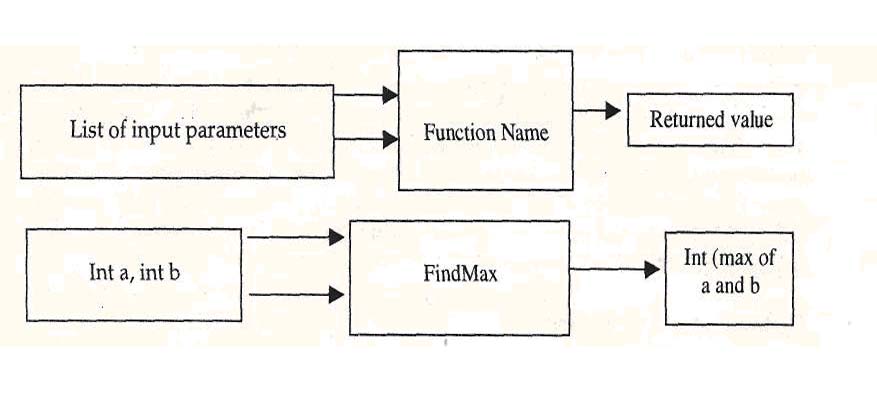
Each function has a name, an optional list of input parameters (also called arguments)with their individual data-type, and a return data-type T.

A compound statement is a group of zero or more statements enclosed within curly braces ( ). Compound statements may be nested i.e., one compound statement may exist inside another one.

A C-statement is a valid C-expression delimited by semi-colon.

The following rules are applicable to all C-statements:

• Blank spaces may be inserted between two words to improve the readability of
the statement. However, no blank space is allowed within a word.

• Most of the C-compilers are case-sensitive, and hence statements are entered in
small case letters.

• C has no specific rules about the position at which different parts of a
statements be written. Not only can a C statement be written anywhere in a
line, it can also be split over multiple lines. That is why it is called
free-format language.

• A C-statement ends with a semi-colon (;).

Functions

Every C program is structured as an assembly of one or more distinct units called functions. Each function comprises of a set of valid C statements and is designed to perform a specific task. Each function is given a unique name for reference purposes and is treated as a single unit by the C-compiler. A function name is always followed by a pair of parenthesis, i.e., ( ).

The statements within a function are always enclosed within a pair of braces { }. Every C program must necessarily contain a special function named main ( ). The program execution always starts with this function. The main function is normally, but not necessarily, located at the beginning of the program. The group of statements within main ( ) are executed sequentially. When the closing brace of the main function is reached, program execution stops, and the control is handed back to the operating system.
Whenever a function is called, it returns to the caller the value it is supposed to return.
Schematically, a C-function may be depicted as:


The C-program code for this function looks like:
Int FindMax(int a, int b)
{
Statement 1;
Statement 2;
return (p) ; //p is the integer value returned by
//this function
}
In plain English it reads: function, whose name if FindMax, takes two integer type arguments, process it some way (i.e. executes the statements contained within) and returns an integer value to the caller, which can be used by other statements of the program.

c programmming online,basic of c language,structure of c programming,c language statements,Compiling a C Program,Pseudo Codes in c,basis data type in c ,variables in C Program,constants in C Program,c operators in C Program,special operators in C ,Decision Making,Branching & Looping in C Program,if statement in C Program,for loop in C Program